
Identity & access / Participant privacy
One network. A different view for each participant.
Organise tenants, users, and groups. Set the contracts and functions each group can access, so participants see the flows that belong to them.
Operate shared financial systems with defined access, governed permissions, and authorised disclosure.
Built with banks and financial institutions. RBAC, privacy, and compliance controls on the EVM tooling you already run.
Let institutions share a system while keeping access to records, transactions, and contract functions specific to each participant.
Participant privacyDefine who can change a permission. Trail adds a review-and-approval workflow before a policy version becomes active.
Policy governanceWith Inlay, give participant RPC nodes their authorised state instead of the full network dataset.
Selective state deliveryGive auditors scoped, expiring disclosure and a verifiable record of access decisions and RBAC changes.
Disclosure & oversightTrail’s agent controls connect an owner and identity to permitted actions, expiry, and decision evidence.
Governed agent workflowsStart with participant access. Add policy governance, then extend privacy to the state held by participant infrastructure. Your applications keep speaking standard JSON-RPC.
Evaluate the caller, contract, function, and arguments before returning a permitted view. The infrastructure holding source data remains trusted.
OPS is running in proofs of concept and pilots with market operators and settlement consortia. Customer identities remain confidential.

Nine requirements: identity, participant separation, existing contracts, and temporary regulator access.
Read the case study 02PilotEach institution sees its own flows. The operator retains an auditable view across the network.
Read the case study 03PilotPrivate participant views with a defined path for approved supervisory disclosure.
Read the case study 04Working demonstrationIdentity, issuance controls, and time-boxed disclosure demonstrated with a simulated bank estate.
Read the case studyExplore the controls behind shared financial infrastructure, confidential workflows, agents, and oversight.
Separate participant information, govern membership and permissions, and decide what state each participant’s infrastructure receives.
Explore the deployment architecture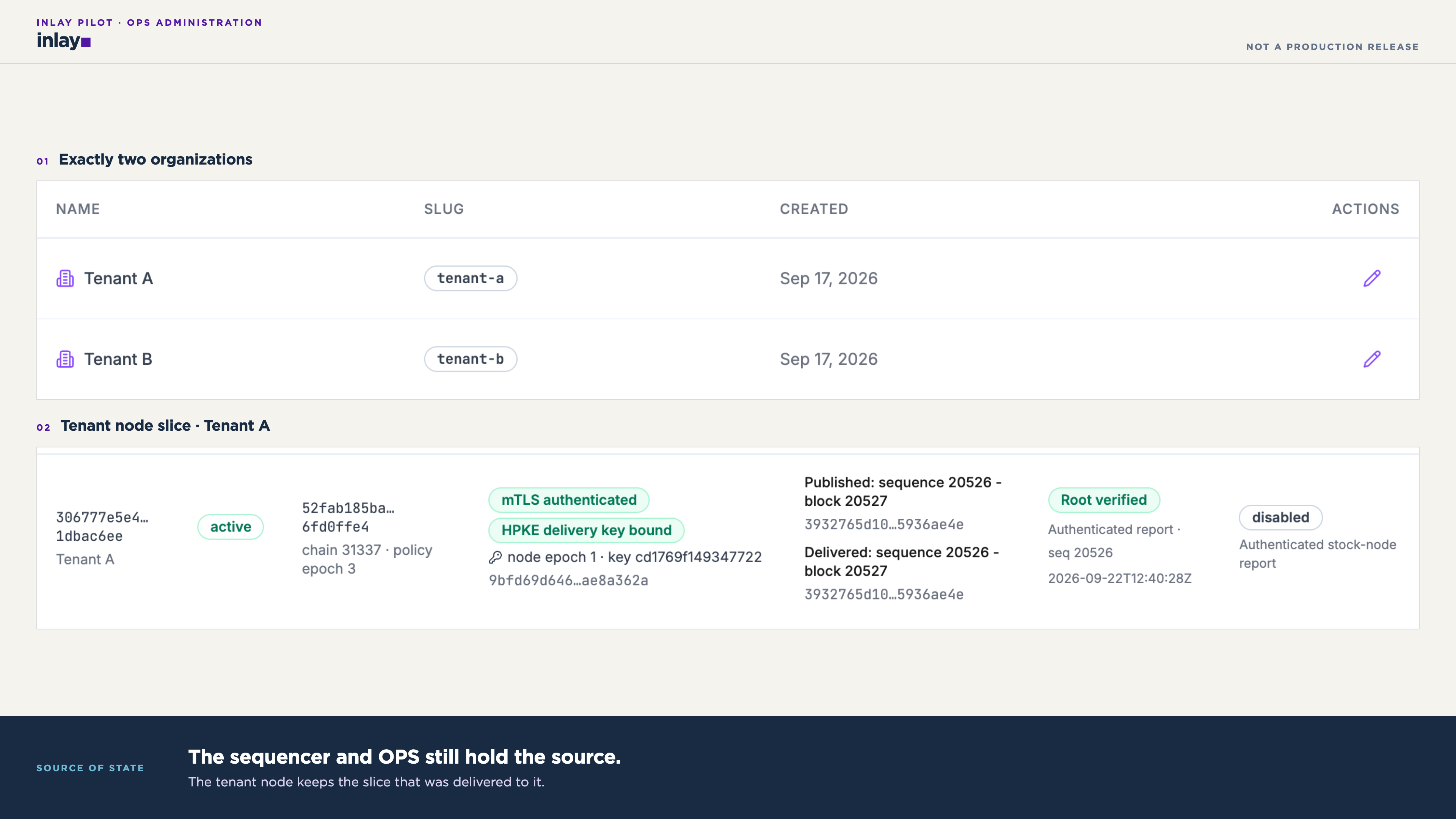
Define who can read, what they can do, and what their node can hold.
Organise tenants, users, and groups. Set the contracts and functions each group can access, so participants see the flows that belong to them.
Identity stays outside the platform boundary. You bring Microsoft Entra ID or did:iden3.
The issuer did the KYC. We verify the claim.
“A zero-knowledge proof can tell a counterparty ‘Yes, this person meets your requirement’ without that counterparty knowing your name, income, or address.”
Single sign-on for banks that already run on Azure.
The holder presents a zero-knowledge proof of a claim: age, residency, KYC passed, not sanctioned. Open Privacy Suite verifies the proof and binds a session and role. The passport, licence or utility bill behind it never reaches the node.
Accredited investor, jurisdiction, account ownership: add a claim type and the same flow verifies it. You extend what can be proven, never what is stored.
Identity, policy, and disclosure sit around your existing EVM infrastructure. Your applications keep speaking standard JSON-RPC.
Legacy and developer tools can use the JWT-injector sidecar to supply identity on standard JSON-RPC calls.
Explore the same chain through each participant’s permissions.
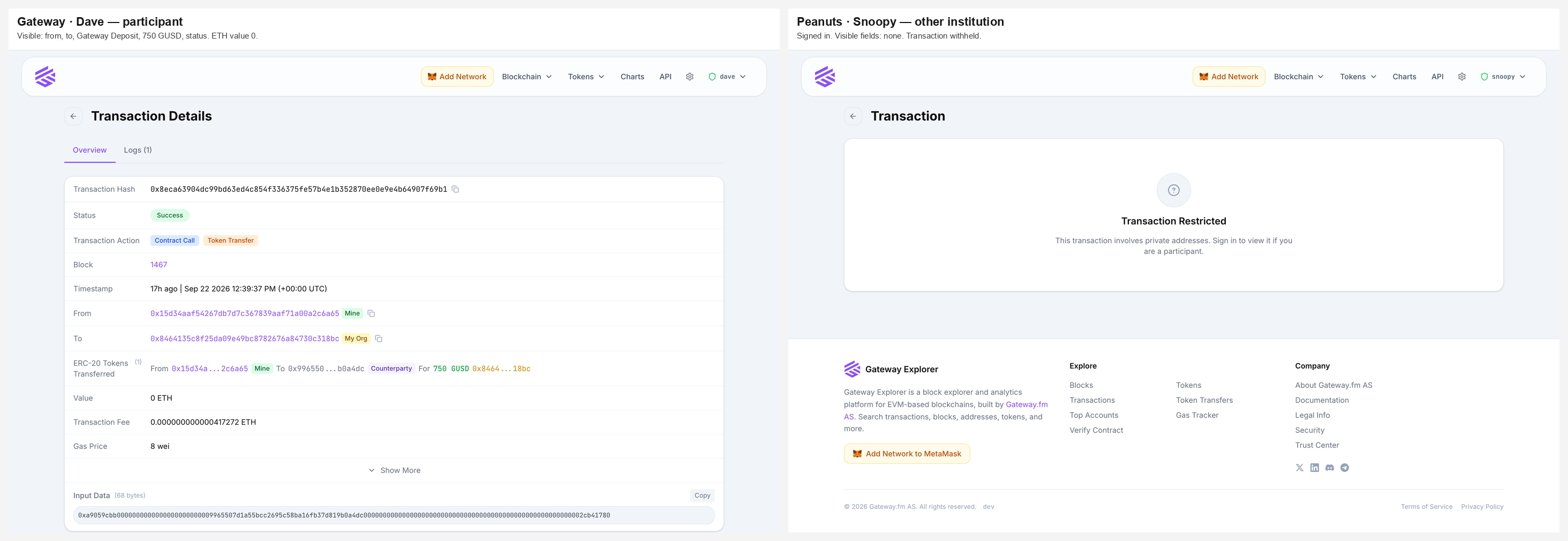
Same transaction, different views. Dave sees 750 GUSD and its details. Snoopy sees Transaction Restricted.
Actual product captureEvery read carries the caller’s identity.
The explorer keeps no chain data of its own.
Address labels explain why a record is visible. Per-caller reads keep one viewer’s data out of another viewer’s page.
Review disclosed addresses, grant expiry, and access activity. Pseudonymous grants keep the underlying address out of the browser.
Explore disclosure & expiryOperators can inspect a user’s view in a read-only session with a persistent banner. A hardened build removes write surfaces entirely.
Explore view as userUse the full explorer toolset when a privacy-filtered deployment isn’t required.
Give each participant a node that holds only the state disclosed to it.
Full state stays with the bank.
The recipient’s own operator cannot read plaintext that its node never receives. Each node verifies its slice against the canonical root.
Witness hashes stand in for hidden subtrees. Nodes verify imported state without re-executing transactions.
Existing tools query the tenant node directly. Calls into missing state fail closed, with no remote fallback.
Gateway’s explorer and unmodified Blockscout run on tenant nodes whose databases contain only disclosed state.
The bank keeps the sequencer and the source state. Each participant’s Inlay RPC node receives only the state it is allowed to hold.
Executes transactions. Holds the source.
The bank decides which state each recipient receives.
Inlay verifies imported state against the canonical root using witness hashes for hidden subtrees, without re-executing transactions.
Connect your policies, identities, and tools around one governed request path.
Store access rules in an on-chain contract instead of Postgres. An indexer reads the contract so the Core RBAC module can enforce your rules.
Use did:iden3 or Microsoft Entra ID out of the box, or connect your existing identity provider. OPS carries the authenticated identity into each governed request.
Wallets, applications, and contracts keep their interfaces. OPS enforces access on the JSON-RPC request path.
Choose your EVM environment.
OPS fits around the client you run.
Enforce access around the node’s JSON-RPC interface.
Use the same identity and policy model across EVM environments.
Build an evaluation around your participants, supported methods, and deployment. Start with the demonstrations already on this page.
Run an authorised call and a denied call under distinct identities. Compare the same transaction in two explorer views.
Inspect a permission change and its audit record. For Trail, scope the proposal, approval, and policy activation workflow.
Inspect the state retained by each Inlay node. Verify witness hashes, local reads, and the components that retain full source data.
Bring a workflow and the access rules it needs. We’ll define what to demonstrate and how to assess it.
Plan an evaluationBring your participants, workflows, and infrastructure requirements. We’ll identify the OPS edition, integrations, and configuration for your deployment.
Thank you